Best Crypto Exchange app In india to Buy Crypto with INR (2026 Guide)
Remember the first time you tried to buy Crypto? I do. It felt like trying to solve a Rubik’s cube while blindfolded.
I had my bank app open, three different exchange tabs, and I was sweating over whether my money would actually vanish into the internet or turn into crypto. It was messy, stressful, and honestly, kinda scary.
It used to be so hard. But in 2026? It is actually pretty smooth if you know where to look.
If you are tired of scams or complicated workarounds, you just want to open an app, send money, and buy crypto with INR directly. No drama, no waiting.
I have tested all the major platforms to see which ones actually let you use your bank account seamlessly.
Finding the best crypto exchange app in India can be tricky with so many options popping up. But don’t worry, I’ve done the heavy lifting.
Here is the ultimate guide to the best exchanges to buy crypto with INR, complete with step-by-step methods for each.
Key Takeaways
- Mandatory Step: You must complete your KYC (PAN + Aadhaar) before you can deposit a single rupee. However, if you want to buy crypto without kyc verification, then there are a few no-KYC crypto exchanges that allow you to do so.
- Fastest Option: CoinDCX, Mudrex, and Delta Exchange are the kings of speed if you want to buy crypto with UPI.
- Safest for Whales: CoinDCX is the top choice if you want to buy crypto with a bank transfer for large amounts.
- Global Access: Binance and Bybit are your go-to options for high liquidity, but you will need to use P2P. Binance is also one of the low-fee crypto exchanges to trade crypto with INR. Binance also offers options for the cheapest ways to buy crypto instantly, using an indirect method
- Legal Status: It is 100% legal to buy crypto with INR as long as you use an FIU-registered exchange.
- Easy Payments: You can easily buy crypto with GPay on several of these compliant platforms.
Before You Buy Crypto with iNR: The Mandatory Checklist
This is the most important part. In 2026, you cannot trade anonymously.
All compliant exchanges follow strict FIU guidelines. Before you even download the best cryptocurrency exchange app in India, make sure you have these four things ready.
- PAN Card: This is mandatory for tax tracking.
- Aadhaar Card: Ensure your mobile number is linked to your Aadhaar for OTP verification.
- Bank Account: The account must be in your own name. You cannot deposit funds from a friend’s or relative’s account.
- Selfie Camera: You will need to take a live selfie for a “liveness check.”
The Universal KYC Procedure
Every legal exchange in India follows this exact flow. Do this first, or you will be blocked when you try to buy crypto with INR.
- Sign Up: Create an account using your email and mobile number.
- Verify PAN: Enter your PAN number and Date of Birth. The system checks this against the income tax database instantly.
- Aadhaar Verification: You will be redirected to a DigiLocker or Aadhaar OTP page. Enter your Aadhaar number and the OTP sent to your linked mobile.
- Selfie Check: The app will open your camera. Look into the oval circle, blink, or turn your head as instructed to prove you are a real human.
- Bank Verification: Enter your bank account number and IFSC. The exchange will deposit ₹1 into your account (Penny Drop) to verify it belongs to you.
Once this is green, you are ready to buy crypto with INR directly.
The “Direct” vs. “P2P” Confusion
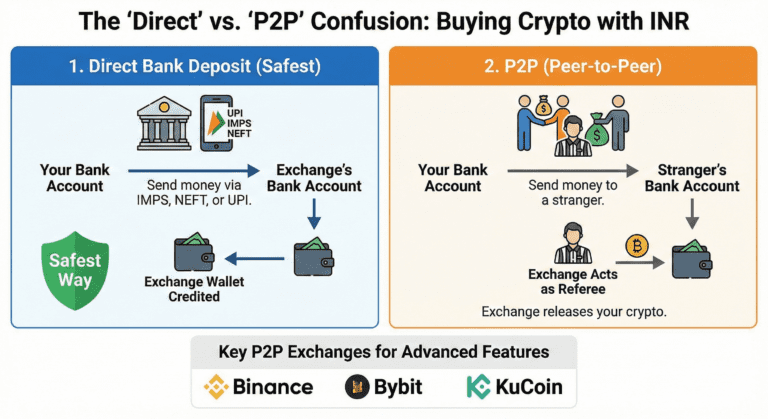
Before we jump in, let’s clear up one thing. When you say you want to buy crypto with INR directly, you usually mean one of two things.
First, there is the Direct Bank Deposit. You send money to the exchange’s bank account via IMPS, NEFT, or UPI, and they credit your Exchange wallet. This is usually the safest way to buy crypto with bank transfer.
Second, there is P2P (Peer-to-Peer). You send money to a stranger’s bank account, and the exchange acts as a referee to release your crypto.
Binance, ByBIT, and KuCoin are the best crypto exchange app in India for p2p market and other advanced features.
Method 1: UPI & Fast Trade (The Fastest Way)
We all love UPI. It is fast, free, and we use it for everything from chai to rent. But not every cryptocurrency exchange supports it because banks can be picky. However, a few brave platforms have kept it running smoothly. You can also buy Crypto with UPI via p2p trading, which I cover below
Delta Exchange India
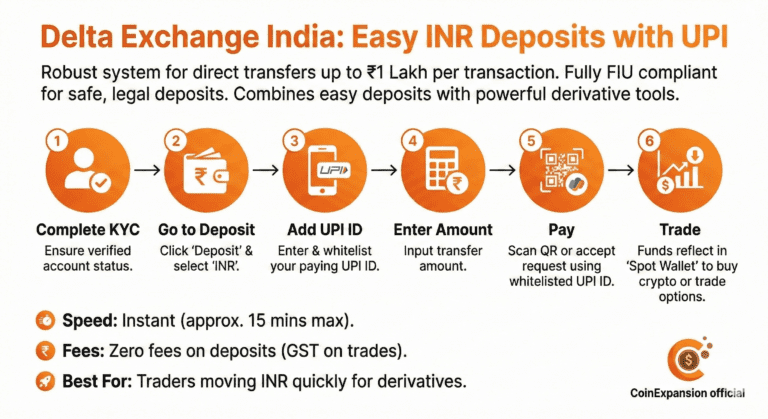
This was a pleasant surprise. While mostly known for options trading, Delta Exchange India has a robust system for deposits.
They support direct transfers, making it incredibly simple to buy crypto with UPI up to ₹1 Lakh per transaction.
You simply whitelist your UPI ID, scan the QR code or accept the request, and the funds reflect almost instantly. It is fully FIU compliant, so your transfers are going to a legal entity, not a random person.
For traders, Delta is arguably the best crypto exchange app in India because it combines easy deposits with powerful derivative tools.
Step-by-Step: How to Deposit via UPI on Delta
- Complete KYC: Ensure your account status is verified.
- Go to Deposit: Click on the ‘Deposit’ button on the home screen and select ‘INR’.
- Add UPI ID: You must enter the UPI ID from which you will pay. This whitelists it for safety.
- Enter Amount: Input how much you want to transfer.
- Pay: A QR code will appear, or you will get a collect request. Pay using the exact UPI ID you whitelisted. This is a smooth way to buy crypto with GPay if that is your linked app.
- Trade: The funds will reflect in your ‘Spot Wallet’. You can now use this INR to buy crypto with INR or trade options directly.
- Speed: Instant (approx. 15 mins max).
- Fees: Zero fees on deposits (GST may apply on trade fees).
- Best For: Traders who want to move INR quickly to trade derivatives.
Signup to claim ₹500 reward
Checkout Delta exchange options Review 2026
Mudrex (The SIP & Basket Specialist)
Mudrex has one of the most streamlined UPI integrations in India. While it’s famous for its “Coin Sets” (crypto baskets), it is also an incredibly fast “Fast Trade” platform.
- The Experience: You can buy crypto with UPI (GPay, PhonePe, Paytm) in just a few taps. The funds are often converted into USDT or your chosen coin almost instantly.
- Why it’s unique: Mudrex is fully FIU-registered and 100% compliant with Indian PMLA guidelines, giving you peace of mind that your UPI transfers are legal and secure.
- Step-by-Step: 1. Open the Mudrex App and tap ‘Deposit INR’. 2. Select ‘UPI’ as your payment method. 3. Enter the amount (starting as low as ₹100). 4. Complete the payment on your UPI app. The crypto reflects in your wallet in minutes.
- Speed: Instant to 15 mins.
- Fees: Zero Fees on INR deposits.
- Best For: Beginners and those looking for automated, recurring investments (SIPs).
Get Tether Gold worth ₹200 on your first deposit of a minimum of 2000 when you sign up using the link or code Z5E25PM1
Check out Mudrex Exchange review 2026
Method 2: IMPS/NEFT/RTGS (Best for Big Amounts)
If you are a “whale” or just want to invest more than ₹1 Lakh, UPI limits will annoy you. This is where standard bank transfers come in.
This is the most reliable way to buy crypto with INR without transaction failures.
CoinDCX
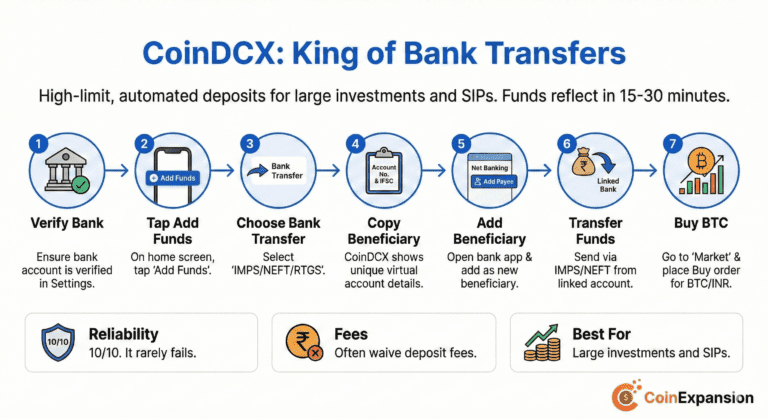
CoinDCX is the king of bank transfers. They provide you with a unique virtual bank account number. You add this beneficiary to your net banking app.
Then, you can transfer as much as you want via IMPS or NEFT. Since it is automated, the funds usually reflect in your wallet within 15 to 30 minutes.
Many serious investors consider CoinDCX the best crypto exchange app in India because of its high-limit deposit feature. It is the gold standard if you want to buy crypto with bank transfer safely.
Step-by-Step: How to Buy with Bank Transfer on CoinDCX
- Check Verification: Ensure your bank account is verified in the Settings.
- Select Add Funds: On the home screen, tap ‘Add Funds’.
- Choose Bank Transfer: Select the option to buy crypto with bank transfer (IMPS/NEFT/RTGS).
- Copy Beneficiary Details: CoinDCX will show you a specific Account Number and IFSC code. This is your unique virtual account.
- Add Beneficiary: Open your bank’s net banking app. Add this account as a new beneficiary.
- Transfer Funds: Send the money via IMPS or NEFT. Important: Ensure you transfer from the same bank account linked to your CoinDCX profile.
- Buy BTC: Once the funds arrive, go to the ‘Market’ tab, select the BTC/INR pair, and place a Buy order.
- Reliability: 10/10. It rarely fails.
- Fees: They often waive deposit fees for bank transfers.
- Best For: Large investments and SIPs.
Claim CoinDcx signup Bonus
Check out CoinDcx Exchange review 2026
Mudrex (Bank Transfer)
For larger sums, Mudrex offers a rock-solid bank transfer method. Like CoinDCX, they provide a reliable environment for high-volume investors.
- The Setup: Mudrex allows you to add your registered bank account for seamless NEFT/IMPS transfers.
- Insurance: A standout feature in 2026 is that Mudrex user funds are insured by Lloyd’s of London, adding an extra layer of “whale-grade” security for your bank deposits.
- Step-by-Step:
- Select ‘Bank Transfer’ in the Deposit section.
- Copy the virtual bank account details provided by Mudrex.
- Add Mudrex as a beneficiary in your bank’s app.
- Transfer your funds via IMPS or NEFT.
- Limits: Very high limits, suitable for long-term portfolio building.
- Best For: Investors who want to fund their account for “Coin Sets” or Futures Trading (up to 100x leverage).
Get Tether Gold worth ₹200 on your first deposit of a minimum of 2000 when you sign up using the link or code Z5E25PM1
Check out Mudrex Exchange review 2026
Delta Exchange India (Bank Transfer)
Apart from UPI, Delta also accepts IMPS, NEFT, and RTGS for larger amounts. This is crucial if you are planning to fund a serious trading account.
You just add their bank details as a beneficiary, transfer the funds, and it gets credited to your trading wallet automatically. It is a solid choice if you prefer to buy crypto with bank transfer.
- Limits: No maximum limit for NEFT/RTGS.
- Speed: IMPS is usually under 30 minutes.
- Best For: High-volume traders looking for the best crypto exchange app in India that handles large sums well.
Signup to claim ₹500 reward
Checkout Delta exchange options Review 2026
Method 3: Crypto P2P (The Global Route)
Okay, what if you want to use a global exchange like Binance or Bybit?
They don’t have a local Indian bank account you can deposit into. So, you can’t technically buy crypto with INR directly from them. Instead, you use their P2P market. There is nothing wrong with p2p trading. I personally bought crypto hundreds of times via p2p market, never faced any issue, just traded with verified merchants.
Binance
Binance remains the deepest, most liquid exchange in the world and, without a doubt, one of the best cryptocurrency exchanges in the industry.
You can find every type of coin on the Binance Exchange, from established coins to potentially profitable low-cap penny cryptos.
Their P2P market is massive. You can find sellers accepting almost any payment method, allowing you to buy crypto with UPI, IMPS, and even local bank transfers.
Look, Binance is the best crypto exchange app in India purely for its liquidity and advanced features it offers for Crypto Trading. You can even filter for sellers who let you buy crypto with GPay specifically.
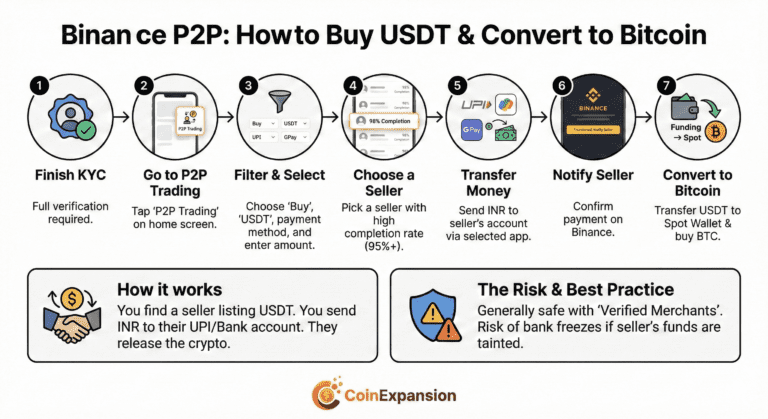
Step-by-Step: How to Buy USDT via P2P on Binance
- Finish KYC: You cannot use P2P without full verification.
- Go to P2P Trading: On the home screen, tap ‘P2P Trading’.
- Filter: Select ‘Buy’ and ‘USDT’. Click the filter icon to select ‘UPI’ or GPay as your payment method and enter your amount (e.g., ₹10,000).
- Choose a Seller: Pick a seller with a high completion rate (over 95%) and click ‘Buy’.
- Transfer Money: Note the seller’s details. Go to your payment app and transfer the money. This is a very common way to buy crypto with UPI on international apps.
- Notify Seller: Come back to Binance and click ‘Transferred, Notify Seller’.
- Convert to Bitcoin: Once the USDT is released to your Funding Wallet, transfer it to the Spot Wallet and buy Bitcoin.
- How it works: You find a seller listing USDT. You send INR to their UPI/Bank account. They release the crypto.
- The Risk: It is generally safe if you stick to “Verified Merchants,” but there is a risk of bank freezes if the seller’s funds are tainted.
- Best For: Accessing global liquidity and advanced trading tools.
Sign up using this link to claim a $100 voucher and 20% fee rebate for lifetime
Visit Binance exchange review 2026
Bybit
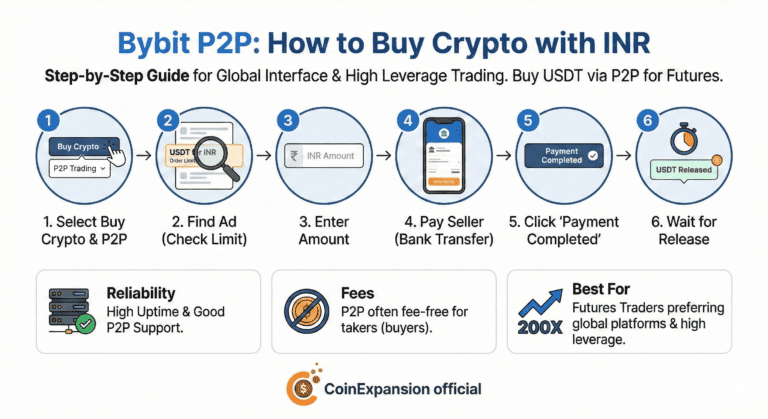
Bybit is the go-to for serious derivative traders who want that global interface. Their P2P market is growing fast and is very competitive. Bybit is also one of the high-leverage crypto margin trading platforms offering leverage up to 200X for futures contracts.
Like Binance, you buy USDT first via P2P and then use that to trade Bitcoin or other perps. For advanced users, Bybit is often the best crypto exchange app in India.
Step-by-Step: How to Buy via P2P on Bybit
- Select Buy Crypto: Click on ‘Buy Crypto’ and then ‘P2P Trading’.
- Find an Ad: Look for a merchant selling USDT for INR. Check their ‘Order Limit’ to make sure it matches your budget.
- Place Order: Enter the INR amount you want to pay to buy crypto with INR.
- Pay the Seller: Use the bank details provided in the chat/order page to send the money. This is essentially how you buy crypto with bank transfer on P2P platforms.
- Confirm Payment: Click ‘Payment Completed’ immediately after sending.
- Wait for Release: The seller will verify and release the coins to your account.
- Reliability: High uptime and good P2P support.
- Fees: P2P is often fee-free for takers (buyers).
- Best For: Futures traders who prefer global platforms.
Read Bybit Global Exchange review 2026
GRAB a bonus up to $30000
KuCoin
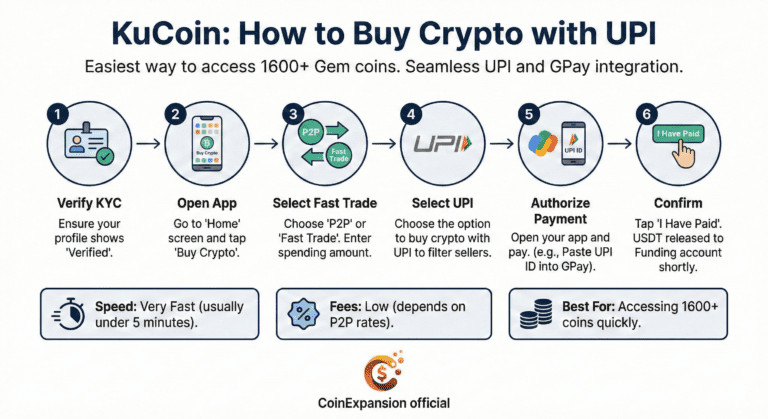
KuCoin is hands down one of the best crypto exchange app in India if you want access to“Gem” coins. You can find more than 1600 coins on the platform.
Launched in 2017, KuCoin carved out a niche by listing small-cap tokens (often called “gems”) long before the bigger exchanges would touch them. If a new meme coin, Rwa Project, Depin Project, layer-2 coin, Gaming Coin, or AI coin is buzzing on Twitter, chances are it gets listed on KuCoin first.
Now, come to the topic. Kucoin has integrated UPI and bank transfer through their “Fast Trade” and P2P systems so well that it feels seamless. You don’t have to stress about finding buyers manually; the system matches you.
You just enter the amount, and you can pay via UPI.
It is honestly the easiest way to buy crypto with INR if you want to buy USDT to trade small-cap coins. Plus, if you prefer Google’s interface, you can buy crypto with GPay here via supported merchants instantly.
Step-by-Step: How to Buy on KuCoin via UPI
- Verify KYC: Ensure your profile shows “Verified”.
- Open the App: Go to the ‘Home’ screen and tap ‘Buy Crypto’.
- Select Fast Trade: Choose ‘P2P’ or ‘Fast Trade’. Enter the amount you want to spend (e.g., ₹5,000).
- Select UPI: Choose the option to buy crypto with UPI. It will filter for sellers who accept it.
- Authorize Payment: You will see the seller’s UPI ID. Open your app and pay. This is how you buy crypto with GPay seamlessly just paste the ID into GPay.
- Confirm: Tap “I Have Paid”. The USDT will be released to your Funding account shortly.
- Speed: Very Fast (usually under 5 minutes).
- Fees: Low (depends on P2P rates).
- Best For: Accessing 1600+ coins quickly.
Sign up to claim a bonus of up to $500
Check out Kucoin Gem Listing Exchange review 2026
Conclusion
Buying crypto in India doesn’t have to be a headache anymore. If you want to buy crypto with INR directly, you have great options.
For speed and ease, I’d say go with Binance or Delta Exchange. They just work. If you need to buy crypto with bank transfer for big money, stick to CoinDCX.
And if you want access to global liquidity, the P2P markets on Binance, Bybit, and KuCoin are there for you. You can even filter sellers there to buy crypto with GPay if that’s your vibe.
Choosing the best crypto exchange app in India really depends on your style. Just remember, safety comes first. Use compliant exchanges, enable 2FA, and never invest more than you can afford to lose.
Always store your coins in a cold wallet
Check out the 4 Best Hardware Wallets 2026: comparison
5 Best Crypto Futures Exchanges in India 2026 (Low Fees & High Leverage)
Frequently asked questions
Q: Can I really buy crypto with INR directly without P2P?
A: Yes, absolutely. Exchanges like CoinDCX and Delta Exchange India allow you to deposit INR from your bank account to their corporate account. This is a direct deposit, not P2P.
Q: Why is KYC mandatory now?
A: The Indian government enforces strict anti-money laundering laws. Every exchange must verify your identity to ensure funds are not coming from illegal sources before you buy crypto with INR.
Q: Which is the cheapest way to buy crypto?
The cheapest way to buy crypto with inr is not to buy it directly with the Buy Button. It is to buy it indirectly via spot trading. You can check out the complete guide in the following article: The Cheapest Ways to Buy Crypto Instantly in 2026 (Stop Wasting Money!)
Q: Why did my UPI transaction fail?
A: UPI limits for crypto can be strict. If it fails when you try to buy crypto with UPI, try a smaller amount or switch to IMPS. It is often a bank-side issue, not the exchange.
Q: What is the best crypto exchange app in India for altcoins?
A: For variety, Binance and KuCoin are the best crypto exchange app in India.
Q: Is it safe to buy crypto wit p2P market?
P2P Market is absolutely safe. Just trade with verified merchants. The best part with p2p market is that you can buy crypto at the best rates with every payment method imaginable. Personally, I use binance p2p market to buy crypto all the time.
Q: Can I use GPay to buy crypto?
A: Yes, exchanges like Binance, Bybit, and KuCoin (via P2P) and Delta Exchange support GPay, allowing you to buy crypto with GPay seamlessly.
Q: What is the fastest way to buy crypto with INR?
Fatest way to buy crypto with INR is via p2p market. It only takes 2 to 5 minutes to complete the trade.